
HomePod mini 2 Is Here: What Works Today, and Why Siri AI Has to Wait
Published:
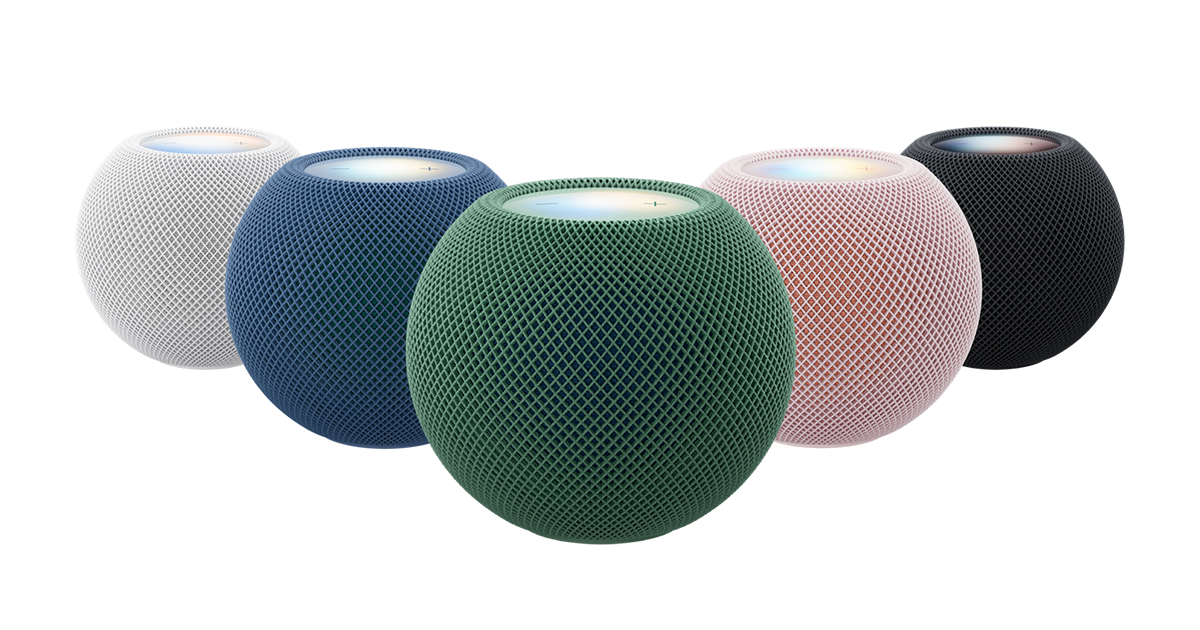
Image:
Apple
Today is launch day for Apple's new HomePod mini 2, so if you pre-ordered one it should be on its way to you, and Apple's launch date also marks when it goes on sale in stores. There's one catch worth knowing before you open the box or head out to buy one this weekend, because Siri AI, one of the headline features, won't be switched on at launch. Here's what you get today, what's coming later and a few tips for setting it up.
What Apple has confirmed
According to MacRumors, Apple has said Siri AI will come to the HomePod mini 2 in a future software update, but it hasn't said when. Siri AI is the cleverer, more personal version of Siri powered by Apple Intelligence, which arrived on the iPhone 15 Pro and newer models in September. So for now, the speaker will work with Siri as you already know it, and the smarter version will appear later through an update.
Here's what is new and available now:
- A newer chip. Inside is the S10 chip from the Apple Watch Series 10, replacing the much older S5 chip in the original HomePod mini. Apple says it enables "advanced computational audio", which means the speaker uses processing to shape the sound, although Apple hasn't directly said it sounds better than the original.
- Faster Wi-Fi. It supports Wi-Fi 6E, up from Wi-Fi 4 on the old model. In plain terms, that's a much newer Wi-Fi standard, so it can make better use of a modern router.
- Surround sound with Apple TV. The new fourth-generation Apple TV 4K can connect to four HomePod mini 2 or full-sized HomePod 2 speakers, set up as a front pair and a rear pair, and Apple says the front two help fill in for a centre speaker. You can mix the two models, as long as each pair matches, so two full-sized HomePods at the front and two minis at the back would work. It isn't a full cinema system with a subwoofer, but it's a tidy all-Apple option.
- Whole Room Audio. A related feature aimed at filling a room with sound when you have people round.
- Use it as your Mac's speaker. You can set the HomePod mini 2 as the default sound output on Macs that have Wi-Fi 6E or later. The full-sized HomePod 2 can now do this too, once it's on HomePod software version 27.2, which you install through the Home app.
- Sound Glow. The top of the speaker glows and pulses along with your music. You don't need the new model for this, because a software update has brought it to the original HomePod mini and the full-sized HomePod 2 as well.
- Three microphones for hearing Siri requests, which is one fewer than the four in the previous model.
- New colours. Green and pink are new, alongside blue, midnight and white.
On the colours, a hands-on video from Craig's Tech Talk, highlighted by MacRumors, shows that the pink, blue and green models use two layers of fabric in different shades. The pink has a light pink outer layer over a coral inner one, the blue has green underneath, and the green has blue underneath, while midnight and white have a much more subtle two-tone look.
You can see the full details on Apple's HomePod mini page.
What we don't know yet
The big unknown is timing. Apple has only said Siri AI will arrive in a future update, and it hasn't given a date or even a rough season, so anyone telling you exactly when it will turn up is guessing. When it does arrive, it should come through a normal software update, so you won't need to buy anything extra.
Should you buy one now?
If you're in the market for a HomePod mini, then yes, I'd go ahead and buy one now rather than waiting for Siri AI to arrive. Everything else works from day one, and the smarter Siri should follow later through an update.
As for who it suits, I think it's a good fit for anyone who's already in the Apple world, so if you use Apple Music, have other Apple home devices or have an Apple TV, it'll slot right in. It's also worth thinking about buying a pair, because two of them together make a nice setup for music or for sound with your TV.
My tips for setting it up this weekend
- Mind your furniture. Give the base a clean, and keep in mind that HomePod bases have historically been known to leave a mark on some wooden surfaces, so think about where you're putting it.
- Pick a good spot. Put it somewhere it can connect easily to your Wi-Fi and hear your voice clearly, and don't cover it up or tuck it behind things.
- Keep the software up to date. Siri AI will arrive through an update, so it's worth keeping an eye on the Home app. If you have a full-sized HomePod 2 and want to use it with your Mac, check it's on version 27.2.
If you get stuck setting up your new HomePod, or you'd like a hand pairing speakers with your Apple TV or Mac, you can ask iHelp AI for a quick answer, or book a session and we'll help you remotely anywhere in the UK, or in person if you're in Dorset.
Alex
Get posts like this by email
Apple news, buying advice and tips, whenever I post something new.
Now and then, never spam. Unsubscribe any time. Privacy
Comments