
Cracked Fold on Your iPhone Duo? Here's What Apple Has Told Its Stores
Published:
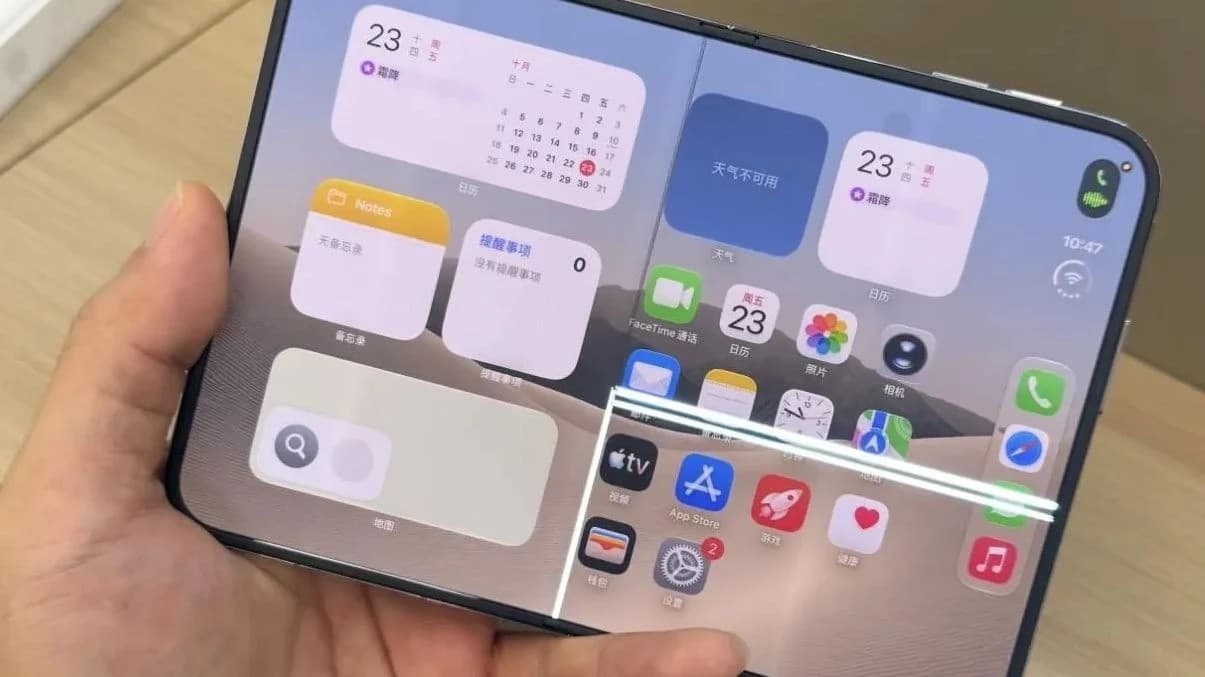
If you've got a new iPhone Duo, or one on the way, you may have seen stories about the inner screen cracking along the fold, and this week things moved on a little because Apple has sent its stores and authorised repairers a memo telling them how to deal with it. So if a line appears down the middle of your screen, you'll want to know what Apple has actually said, what happens when you take it in, and what's still only reported.
What Apple has said publicly
On Monday Apple gave MacRumors a statement saying it is aware of an issue affecting the inner display on a small number of iPhone Duo units, and that anyone with a problem should contact AppleCare for a replacement. AppleCare here simply means Apple's own support team, and you can reach them through Apple Support.
Apple also said a few other things worth knowing:
- Most iPhone Duo units aren't prone to the problem.
- Phones that are affected seem to show the fault quite quickly after people start using them.
- There is no recall, so Apple isn't asking everyone to send their phones back.
- There's no public repair programme on Apple's website for this yet, which is the kind of page Apple sometimes puts up when a known fault affects a batch of devices.
What the leaked memo reportedly says
This part comes from an internal memo that MacRumors says it obtained, rather than from anything Apple has published, although MacRumors has a long and solid record of getting hold of Apple's internal service documents and reporting them accurately.
According to MacRumors, the memo went to Apple Stores and Apple Authorised Service Providers this week, and it tells technicians that if a customer reports the problem they should inspect the phone and then repair or replace it using their normal procedures. The memo also describes the issue as affecting a small number of units, which matches what Apple said in public. MacRumors points out that the instructions are simple, but that Apple bothering to send a memo at all suggests the fault is common enough to need official guidance.
The fault itself, as early owners have described it since the phones started arriving about a week ago, shows up as lines running down the middle of the inner screen and towards the right hand side.
What's behind it? Only theories so far
Apple hasn't said what's causing the cracking. The repair specialists at iFixit, who are well respected for taking new devices apart and explaining how they're built, did a teardown of the iPhone Duo and think the problem is likely linked to a faulty hinge on the affected phones. That's their view from looking inside one, so treat it as an informed guess rather than Apple's explanation.
What it means for you
If your iPhone Duo's inner screen looks fine, there's nothing you need to do, because Apple says most units aren't affected and the ones that are tend to show it early on. If you do spot a line or crack along the fold, the good news is that stores now have clear instructions to check it and repair or replace it, so you shouldn't find yourself having to argue your case.
Before you hand it over, make a backup. The easiest way is to go to Settings, tap your name at the top, then iCloud, then iCloud Backup, and tap Back Up Now while you're on Wi-Fi. That way, if Apple swaps the phone rather than repairing it, you can put everything back on the new one.
What I think
If you've got a line or crack along the fold, I'd book a Genius Bar appointment rather than waiting to see whether Apple announces a wider repair programme. I would, though, ring the store you're booking at before you go, because I've seen people turn up at stores that don't yet have everything they need to repair or replace these phones, and a quick call could save you a wasted trip.
If you're still waiting on an iPhone Duo order, this memo doesn't really change my advice. It's the sort of phone where your opinion of it shifts with every day you use it, so I think everyone is going to end up with their own, quite different experience of it.
Need a hand?
If you're not sure whether what you're seeing on your screen is this fault, or you'd like help getting a backup sorted before your appointment, ask iHelp AI at /chat for a quick answer, or book a session and we'll go through it with you, remotely anywhere in the UK or in person here in Dorset.
Alex
Get posts like this by email
Apple news, buying advice and tips, whenever I post something new.
Now and then, never spam. Unsubscribe any time. Privacy
Comments