
Apple's Touchscreen OLED MacBook Pro Is Here. Here's What It Does and Who It's For
Published:
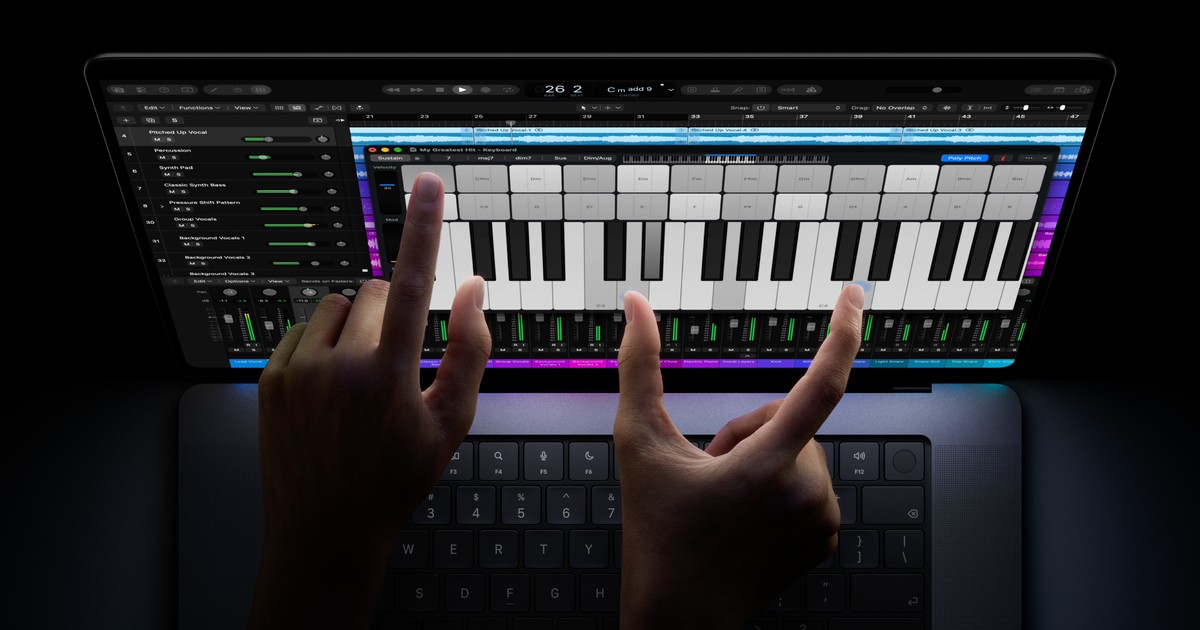
Image:
Apple
Apple has just announced the first MacBook Pro with a touchscreen, and it brings a lot with it: a brand new OLED display, a Dynamic Island at the top of the screen like the one on recent iPhones, a lighter body and, after ten years away, the glowing Apple logo on the lid. It arrives alongside the new M6 MacBook Pro, so if you've been thinking about a new Mac you now have more choice than you've had in a long while, and I want to help you work out which one makes sense for you.
What Apple has announced
The new MacBook Pro comes in 14-inch and 16-inch sizes, and it runs on the same M5 Pro and M5 Max chips as the current MacBook Pro, which Apple is still selling. You can read the full details in Apple's UK Newsroom announcement and on the MacBook Pro page, but here are the parts that matter most.
A new kind of screen. Apple calls it the PROLED XDR display, and it uses something called tandem OLED. In plain words, every tiny dot on the screen makes its own light rather than relying on a light panel behind it, and "tandem" means there are two layers of these light-making dots stacked together, which helps with brightness. Because each dot can switch itself fully off, blacks look truly black. Apple says it reaches up to 2000 nits of brightness (nits are simply a measure of how bright a screen can go, and 2000 is very bright for a laptop), so it should be easy to read even in strong sunlight. It also has ProMotion, which means the screen can refresh as slowly as 10 times a second to save battery or as quickly as 120 times a second so scrolling looks smooth. Apple is calling it the "world's best laptop display", and there's an optional nano-texture finish, now etched into the glass, if you want even less glare.
Touch, for the first time on a Mac. You can now swipe to scroll a webpage, pinch to zoom into a photo, drag slides between presentations and double-tap a window to make it fill the screen. Apple has built the touch sensor into the display itself rather than laying it on top, which it says makes it feel more responsive. Your keyboard and trackpad still work exactly as before, so touch is an extra way of doing things rather than a replacement. Apple has also redesigned the hinge so the screen stays steadier when you tap it, and on video calls the camera picture is smoothed out automatically so the other person doesn't see it wobbling while you touch the screen.
Your apps should mostly just work. Apple says macOS turns a tap into a click automatically, so many apps you already use will respond to touch straight away. Apple has also named a range of apps that are being made to take advantage of touch, including Microsoft Word, Excel, PowerPoint and Outlook, Zoom, Canva, Adobe Lightroom and DaVinci Resolve.
The Dynamic Island replaces the notch. If you have a recent iPhone, you'll know the little black pill shape at the top of the screen that grows to show things like a phone call or the music that's playing. That's now on the Mac, and it's where you'll find Spotlight (the Mac's search), Live Activities (live updates such as a timer or a delivery) and Siri AI. You can answer a call, pause a song or accept an AirDrop from there, and with the touchscreen you can just tap it. As MacRumors points out, this doesn't mean Face ID has come to the Mac, because you still unlock it with Touch ID, your fingerprint, and the camera is a 12-megapixel Center Stage camera.
Thinner and lighter. The 14-inch model now weighs 3 pounds (about 1.36kg), half a pound less than before, and the 16-inch weighs 4 pounds (about 1.81kg), 0.7 pounds less. The 16-inch is nearly a millimetre thinner and the 14-inch is half a millimetre thinner. Slimmer borders around the screen also mean the displays are now 14.2 inches and 16.3 inches.
The glowing Apple logo is back. Apple took the lit-up logo off the lid in its 2016 redesign, and it returns now, a decade later.
Everything else. According to MacRumors' coverage of the launch, you get:
- Three Thunderbolt 5 ports, plus HDMI, an SD card slot, MagSafe charging and a headphone socket
- Support for up to four external screens
- Up to 128GB of memory and up to 16TB of storage
- A new six-speaker sound system with 50 percent deeper bass
- Wi-Fi 7 and Bluetooth 6
- Fast charging to 50 percent in 30 minutes
Apple is selling this new model alongside the existing MacBook Pro models, which don't have touch, and the new M6 14-inch MacBook Pro. Pre-orders are open now in the UK, and Apple says it starts arriving on Friday 6 November.
What it costs
In the UK, the 14-inch model with M5 Pro starts at £2,899 and the 16-inch at £3,399. With M5 Max, the 14-inch starts at £4,499 and the 16-inch at £4,799. That puts it at the top of Apple's laptop range, above the M6 MacBook Pro.
What was rumoured, and how it turned out
Before the launch, MacRumors had reported that Apple was expected to bring out exactly this: touchscreen OLED models, a Dynamic Island in place of the notch, a new hinge, a lighter design and the M5 Pro and M5 Max chips. MacRumors gathers reports from supply chain sources and other well-placed outlets and has a good track record, and on this occasion the reports were spot on.
There was also some fun guessing about the name. MacRumors wondered whether a teaser video from Apple's CEO John Ternus hinted at a "MacBook Studio", and others had suggested "MacBook Ultra", but MacRumors itself described this as last-minute speculation and Apple stuck with MacBook Pro in the end. I'd hoped for a separate MacBook Studio myself, so that one stays a wish for now.
What I think
At the end of the day, I think this model is probably worth the extra money for professionals. If you're a photographer, a video editor, a developer or anyone working in the creative world, you'll really find the power beneficial, and that screen is clearly built with you in mind.
As for the touchscreen itself, it's yet to be seen how much it will benefit everyday users. No doubt over the coming days and weeks we'll see how developers have already made their apps work with touch on the Mac, and that will tell us a lot more. I think the other improvements, like it being a little bit lighter, will be very welcome.
Should you buy one now?
If you need a MacBook Pro, right now is a very good time, because you have a good set of options. You can get one without a touchscreen that has the same processor, or you can get one with the touchscreen, and there's also the new M6 MacBook Pro.
If you'd like to go ahead, here's what I'd do:
- Check the delivery date for the model you want on the Apple UK website before you order.
- Think about whether you'll use the touchscreen and the extra screen quality, because the non-touch MacBook Pro has the same M5 Pro and M5 Max chips.
- If you use particular apps for work, keep an eye out over the next few weeks for news of how well they work with touch.
If you're not sure which Mac is right for you, or you'd like a hand moving everything across from your old one when it arrives, just ask. For quick questions you can talk to iHelp AI at /chat, and if you'd rather we went through it together, you can book a session with us, either remotely from anywhere in the UK or in person if you're in Dorset.
Alex
Get posts like this by email
Apple news, buying advice and tips in plain English, from the iHelp team.
Now and then, never spam. Unsubscribe any time. Privacy
Comments