
Got an iPhone Duo This Weekend? How to Spot Apps Made for the Bigger Screen, and What to Do About the Ones That Aren't
Published:
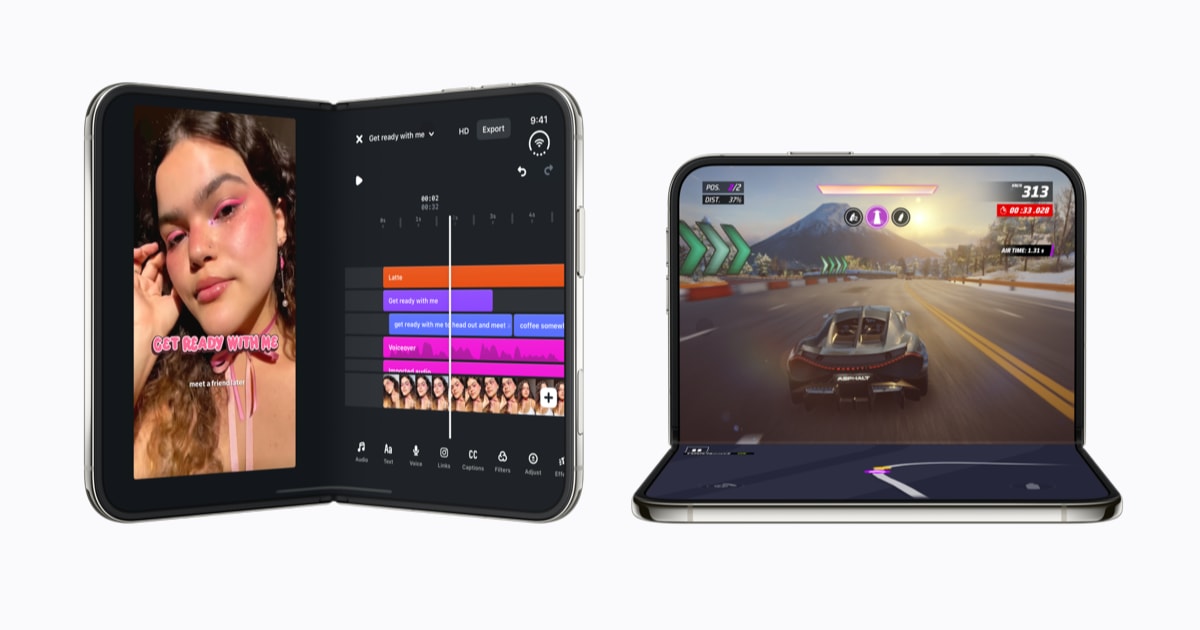
Image:
Apple
The iPhone Duo, Apple's first folding iPhone, is now on sale, and if you're setting one up this weekend you may notice that not every app fills that big inner screen. Apple has confirmed a new Made for iPhone Duo label in the App Store and named more than 50 apps that are, or soon will be, updated for it, so here's what that label means, why some apps still look a bit lost on the larger display, and what you can do about it.
What Apple has confirmed
In its Newsroom announcement, Apple says apps that have been optimised for the iPhone Duo will carry a Made for iPhone Duo badge on their product pages in the App Store, which is the page you see when you tap on an app before downloading it. Apple is also putting together new editorial collections of iPhone Duo apps and games in the App Store, and says more app updates will keep arriving throughout the year.
Apple describes the inner display as 50 percent larger than the iPhone 18 Pro Max's screen. Because the outer and inner screens share the same shape, Apple says apps scale up smoothly when you open the phone, so you can carry on where you left off. The iPhone Duo also brings Split View to iPhone for the first time, which means you can have two apps open side by side on the inner screen.
Which apps are ready
Apple has named a long list of apps that have been updated or are being updated. Some of the better known ones include:
- TV and films: Netflix, Prime Video, Paramount+ and Apple TV. Prime Video, for example, can play a show on the top half of the screen while cast details appear on the bottom half when the phone is partly folded.
- Work and organising: Zoom, Slack, Fantastical, Things, Bear and Notewise. Apple says Microsoft Word and Outlook will get their updates in the coming weeks.
- Photos, video and social: Instagram, Edits, VLLO and Detail.
- Games: Asphalt Legends, plus Sneaky Sasquatch and Retrocade on Apple Arcade. Zenless Zone Zero is due to be updated next month, and a new game called UnGodly arrives in November.
- Cooking and everyday: NYT Cooking and OpenTable, among others.
MacRumors also lists apps such as Flighty, Airmail and SmartGym as being on Apple's list, and it reports that Apple has updated its own free GarageBand app with a wide layout for the inner screen, which gives you more room for editing music and playing the on-screen instruments.
Why some apps sit in a small box
All existing iPhone apps will run on the iPhone Duo, but how they look depends on how recently the developer has updated them. MacRumors explains that it comes down to which version of Apple's developer tools (known as the SDK, or software development kit) an app was built with, and it describes three levels:
- Fully optimised apps, built with the newest tools for iOS 27.1, fill the whole inner screen. These are the ones that earn the Made for iPhone Duo badge.
- Apps built for iOS 27 fill most of the inner screen but leave a strip clear along one edge where the status bar sits.
- Older apps, built for iOS 26 or earlier, still work, but they appear in the middle of the inner screen with lots of empty space either side.
So if an app looks like a small box floating in the middle of your new screen, nothing is wrong with your phone, it simply means that app hasn't been updated for the iPhone Duo yet.
What reviewers have said
According to 9to5Mac, limited support from other app makers was one of the main issues raised in early reviews of the iPhone Duo, and its own review described the same three levels of support. 9to5Mac also passes on a tip from reviewers, which is to try apps on the inner screen both upright and turned sideways, because different apps tend to be designed with one or the other in mind. Apple, for its part, says the situation is changing quickly and calls the response from developers "incredible".
An app of my own: Bosh
I've built an app of my own called Bosh, which is optimised for the iPhone Duo, and it's available to try out now through TestFlight. Bosh is a task and habit tracker with a bit of character, and it gives you encouragement along the way as you work through your tasks and build your habits. It also supports Live Activities, which show live progress on your Lock Screen without you having to open the app, and widgets, which are the small panels you can add to your Home Screen to see things at a glance, so if that sounds like the sort of thing you're after, I think you'll really enjoy Bosh.
TestFlight is Apple's free app for trying out apps before they're released on the App Store, and MacRumors reports that Apple has updated TestFlight itself to work properly on both of the iPhone Duo's screens. To try Bosh, install TestFlight from the App Store and then open this TestFlight link for Bosh on your iPhone, which will take you through joining and installing it.
What it means for you
If you've just got an iPhone Duo, there are a few simple things you can do:
- Look for the badge. Open the App Store, tap on an app and check its page for the Made for iPhone Duo label, which tells you it's been designed to fill the big screen.
- Keep your apps updated. New versions are arriving all the time, so it's worth checking the updates section of the App Store regularly, or making sure automatic app updates are switched on in Settings under App Store.
- Try turning the phone. If an app looks odd on the inner screen, try holding it the other way, as reviewers suggest.
- Be patient with the rest. Older apps will still work, they'll just sit in the middle of the screen until their developers catch up, and some big names such as Word and Outlook have updates on the way.
If you're getting to grips with a new iPhone Duo and something isn't behaving as you'd expect, you can ask a quick question any time with iHelp AI, or if you'd rather someone walked you through setting it up and getting your apps sorted, you can book a session with us, either remotely anywhere in the UK or in person here in Dorset.
Alex