
How Apple Rethought iOS for iPhone Duo
Published:
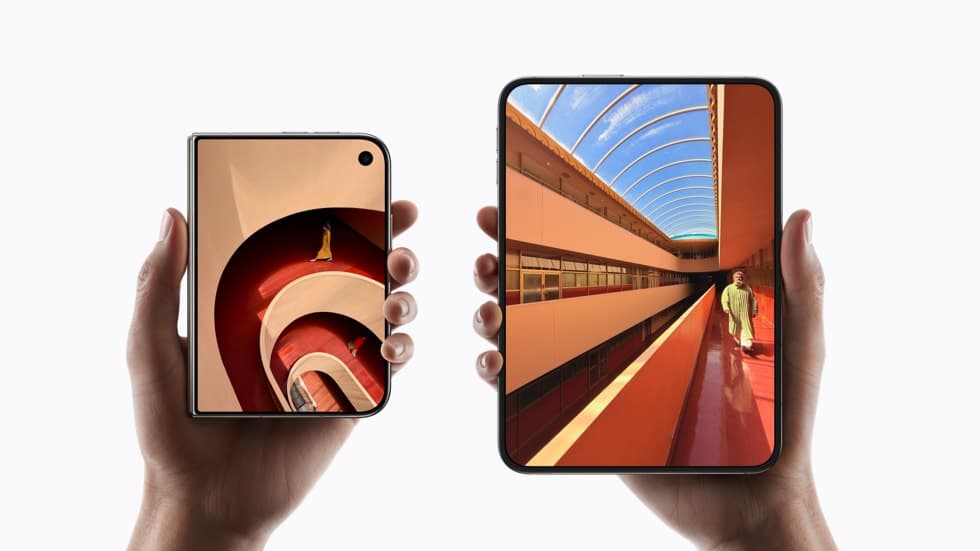
Image:
Apple Newsroom
Most of the coverage of iPhone Duo this week has been about the hinge, the price and the crease, and fair enough, because those are the things you notice first. But the part I keep coming back to is the software. Apple hasn't just put iOS on a bigger screen and hoped for the best. It has quietly reworked how iOS behaves so that the same phone makes sense in two completely different shapes, and once you start looking at the details, they're cleverer than they first appear.
Two shapes, one phone
Closed, iPhone Duo measures 117.8mm by 84.1mm and 11.3mm thick, which is a touch smaller than a UK passport and, to my eye, about the same feel in the hand. It's worth being clear about what that shape means, because it's easy to picture it wrongly. Closed, the Duo is shorter than a normal iPhone, but it's also wider than any iPhone Apple has made, at 84.1mm across against 71.9mm for an iPhone 18 Pro. So it's a short, wide, pocketable thing with a 5.4-inch screen on the front that works as a proper phone rather than a compromise.
Open it and it becomes 164.6mm wide and just 5.2mm thick, with a 7.6-inch display, and that's much closer to an iPad mini than to any iPhone. The iPad mini's screen is 8.3 inches, so you're not far off, and the way Apple has laid out the software makes it feel more like a small tablet than a big phone.
The clever part is how the two screens relate to each other. Apple has given both displays the same aspect ratio, so when you open the phone, whatever you were looking at scales up proportionally rather than reflowing into a different layout. Your place on the page, the shape of the photo, the video you were watching, all of it simply grows. That sounds like a small decision, and it's the one that makes the whole thing feel coherent rather than like two separate devices bolted together.
Moving the furniture to the sides
Here's where it gets interesting. On a normal iPhone, the Dock sits along the bottom and the Lock Screen controls sit at the bottom too, because the screen is tall and narrow and there's height to spare. On the Duo, Apple has moved the Lock Screen controls, the Dock and the app navigation over to the sides instead, and it has done that on both displays, the outer one as well as the inner one.
The reason is vertical space. Both of the Duo's screens are wider for their height than a normal iPhone's, because they share the same aspect ratio, so on either one height is the thing you run out of first, and a Dock across the bottom would eat into the very dimension you have least of. Pushing the controls to the sides means the content in the middle keeps its full height, so a document, a web page or a video gets all of the room it can, whether the phone is open or closed. It's the same instinct as the sidebar on iPad, and it's a sign that Apple thought about the shape of the screens rather than just stretching what it already had.
The status bar has been rethought along the same lines. Instead of a strip across the top, it's now a circular, flexible system that nestles into the corners of the screen, and the Dynamic Island runs vertically down the side of both displays rather than sitting in the middle at the top, expanding from there for Live Activities and alerts. Again, the whole point is to keep the middle of the screen clear.
It reacts as you use it
Apple's own words are that content "reacts as it folds, reorients when turned to the side, and switches to the appropriate display when flipped over". In practice that means the phone is constantly deciding which shape it's in and what to do about it. StandBy is a good example, because it now works on either display without needing a charger, so the phone can sit on your desk as a clock, a calendar or a photo frame whichever way round you leave it.
The Home Screen gets two pages when open, with a Today View for widgets on the left, and the Duo is the first iPhone that can run two apps side by side in Split View. You can swap between apps quickly, keep two Safari windows open at once, save pairs of apps you use together, and hold a conversation with Siri AI while still looking at whatever you were reading. All of that is iPad behaviour, and it's telling that Apple has chosen to bring it across rather than keep the iPhone strictly single-app.
The outer screen earns its place
It would have been easy for the outer display to be an afterthought, a place to check notifications before opening the real screen, but Apple has given it its own jobs. Duo Preview shows the person you're photographing a live preview of themselves on the outer screen while you use the main cameras. Kid Cue plays Peanuts animations out there to hold a child's attention long enough for the shot. Duo FaceTime uses the outer screen so more than one person can be on a call, and Dual Capture in FaceTime lets you send the front and rear camera at once.
Those are small features, and they're exactly the kind that get used every day, particularly by anyone with grandchildren who refuse to look at the camera.
What it means
iPhone Duo ships with iOS 27.1 rather than a new operating system, and I think that's the right way to read it. Apple hasn't reinvented iOS, it has taught it to understand what shape it's running on, and the result is a phone that feels like a passport in your pocket and a small iPad in your hands without either mode feeling like the compromise.
Whether that's worth £1,999 to you is a different question, and I've given my honest view on who it's for in the full explainer. But as a piece of software design, it's the most thoughtful thing Apple showed this week, and it's the part I'm most looking forward to trying in person when it arrives on 23 October.
If you're curious about the Duo and want to talk it through, or you'd like help deciding between it and an iPhone 18 Pro, book a session and we'll go through it together.