
Apple HomeView Reviews Are In: What They Say, the Siri Fix Coming in December and Whether to Wait
Published:
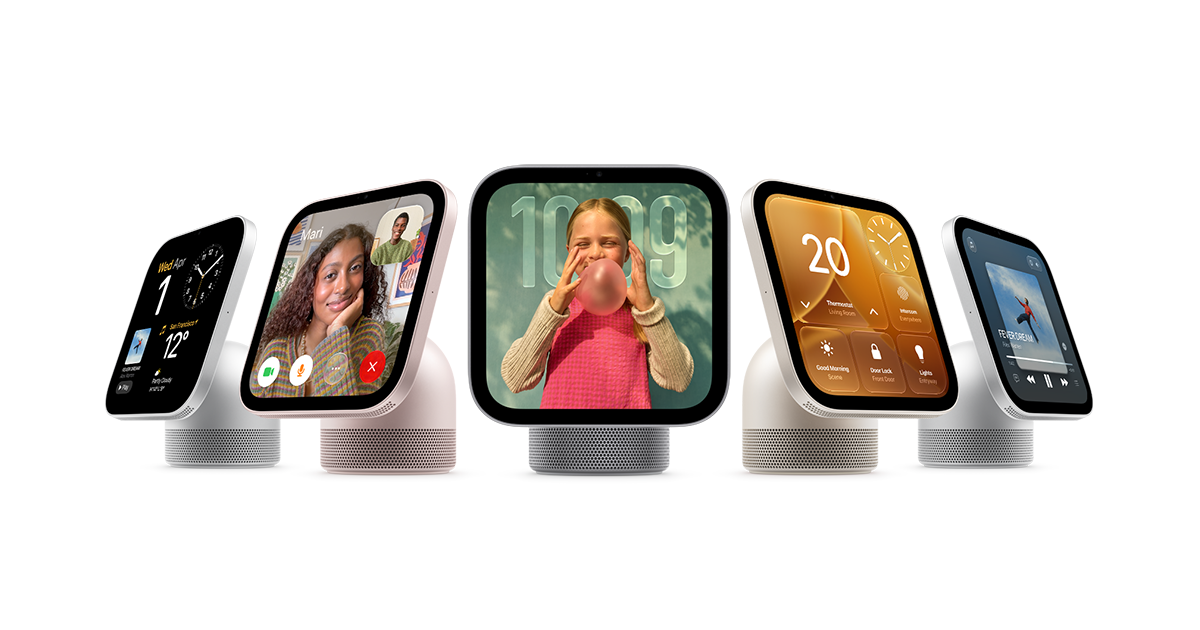
Image:
Apple
Apple's new HomeView smart display went on sale on Friday, and the UK is one of the countries it launched in. The first reviews describe a charming little device with plenty of promise, but one that feels a bit thin on day one. Apple has also confirmed a software update next month to fix a Siri problem that reviewers ran into, and it has explained in detail how the built-in camera and microphones keep what they see and hear private. If you're wondering whether to buy one, or whether it would make a good Christmas present, here's the picture so far.
What HomeView is
HomeView is a 7-inch square touchscreen that sits on a rounded aluminium speaker base, joined by a small metal hinge so you can tilt the screen forwards and backwards. Apple pitches it for the kitchen counter, bedside table or a side table, and there's also a wall-mounted version, although that needs a separate mount bought on top. It comes in Starlight, Rose Pink, Silver and Space Grey.
Inside is Apple's A18 chip, which runs Siri AI, the smarter version of Siri that arrived with iOS 27. You can use HomeView to talk to Siri, make FaceTime video calls, listen to music and podcasts, check your calendar and the weather, and control smart home gadgets like lights, locks and cameras. It uses its camera and your voice to recognise up to six people in the household, so each person sees their own calendar, reminders and messages when they walk up to it.
There's no App Store. Instead it comes with Apple's own apps, including Calendar, FaceTime, Find My, Home, Intercom, Messages, Music, Podcasts, Reminders, Safari, Timers and Weather, and it can run audio and video apps that already work with CarPlay, such as Spotify and Apple TV. MacRumors has the full list. It isn't being sold in the EU, because Siri AI isn't available there.
HomeView costs £299 in the UK, and you can find the details on Apple's UK website. If you'd like the wall-mounted version, remember that the mount is sold separately on top of that.
What the reviews say
The design and screen. Reviewers love the look of it. 9to5Mac's reviewer, who lived with one in the kitchen for ten days, called it an "adorable little thing" and felt the square screen makes it look like a purpose-made gadget rather than an iPad on a stand. The screen gets bright enough for a sunny kitchen and can dim right down, which matters if you want one by the bed. The small size worried them at first, but text and timers are easy to read from across the room, and the main downside is more scrolling when you're following a recipe.
Sound. 9to5Mac placed the sound somewhere between a HomePod mini and the full-size HomePod, so it's perfectly decent for music, radio and podcasts without being spectacular. You can also send audio to it from your iPhone using AirPlay, which is Apple's way of beaming sound from one device to another.
Everyday use. Most of the time HomeView sits there showing a "face", much like an Apple Watch does, and you choose what it displays. That could be a clock, the weather, your calendar, a set of little information panels called widgets, live views from your security cameras, or your photos. The photo option effectively turns it into a digital picture frame, and it can show a shared album that the whole family adds to, which I can see going down well with grandparents. One clever touch is the recipe mode: open a recipe in Safari, or hold your iPhone near HomeView to pass a recipe across, and it lays the ingredients and steps out neatly, even offering to start timers at the right moments. It can trip up on recipes split across several web pages, though.
Recognising who's there. 9to5Mac found the face recognition worked surprisingly well at telling two people apart, and it wouldn't show one person's messages to the other. Switching between people sometimes took a few seconds.
What's missing. This is where the "thin at launch" feeling comes from. There are no physical buttons at all, so changing the volume means using the screen or asking Siri. There's no Notes app and no proper Photos app, and the range of other apps is limited to audio and video for now. The quick settings panel can't be rearranged either.
The Siri problem, and the fix Apple has confirmed
Tech journalist Joanna Stern found that Siri AI on HomeView once told her it didn't have a camera to see her, which is odd for a device with a camera on the front. Siri also refused to open her garage door or unlock her front door, even though HomeView had recognised her. Apple confirmed to her that a software update in December will fix the camera mix-up and will let Siri handle door locks and garage doors once it has recognised you, "giving users more ways to manage security accessories", as Apple's spokesperson put it.
In the meantime, you can still unlock doors and open garages from HomeView itself by opening the Home app and tapping the controls on screen. It's only asking Siri to do it that doesn't work yet.
How Apple keeps the camera and microphones private
Because HomeView is always quietly looking and listening for people, Apple has published a detailed explanation of how it protects that data. In plain words, the camera and microphone feeds go into a sealed-off part of the chip that Apple calls a Secure Exclave. That walled-off area works out whether someone is in the room and, if so, which member of the household it is. The rest of the device only receives a simple note along the lines of "this is probably Mum, standing here", never the picture or the sound itself, and the raw footage and audio are thrown away.
When the camera or microphone is fully in use, for example on a FaceTime call, a light comes on to tell you, and Apple says that same sealed-off area controls the light, so nothing can be passed on without it being lit. The same system also protects camera and microphone indicators on the iPhone 18 Pro, iPhone Duo and MacBook Neo.
What might come later (not confirmed)
9to5Mac's reviewer believes there are signs Apple could soon widen the range of apps that work on HomeView, beyond just audio and video, since CarPlay already supports many more kinds of app. 9to5Mac is a well-informed site, but this is the reviewer's reading of the signs rather than a plan Apple has announced, so I wouldn't buy one counting on it.
Should you buy one?
My advice for most people is to wait a little. The December update should sort out the Siri issues, and it makes sense to see how HomeView settles in and whether more apps arrive before you spend the money. The exception is Christmas, because a gift has a deadline and you can't always wait, so if you've got someone in mind and it suits them, buying now is reasonable.
Apple has shown HomeView off as something for a busy family, but I think anyone could get on with one, as long as they're well settled into Apple's world. It leans heavily on an iPhone for widgets, personal information and messages, so it really works best for someone who already uses an iPhone and other Apple devices day to day.
As for the camera, cameras on gadgets in our homes are pretty normal now, and it wouldn't worry me. If the idea of one in your kitchen or bedroom does make you uneasy, though, that's completely fair, and in that case HomeView probably isn't the right device for you.
What to do now
- Thinking of buying for yourself: I'd hold off until the December update is out.
- Buying as a Christmas present: make sure the person uses an iPhone and is comfortable with Apple devices, and budget £299, plus a mount if they'd like it on the wall.
- Already got one: use the Home app on the screen to unlock doors for now, and install the update when it arrives next month.
If you've got a quick question about HomeView, or whether it would suit someone in your family, you can ask iHelp AI any time. And if you'd like us to help set one up, get the family profiles and photos sorted, or show you how it all works, you can book a session with us, either remotely anywhere in the UK or in person across Dorset.
Alex
Get posts like this by email
Apple news, buying advice and tips, whenever I post something new.
Now and then, never spam. Unsubscribe any time. Privacy
Comments